
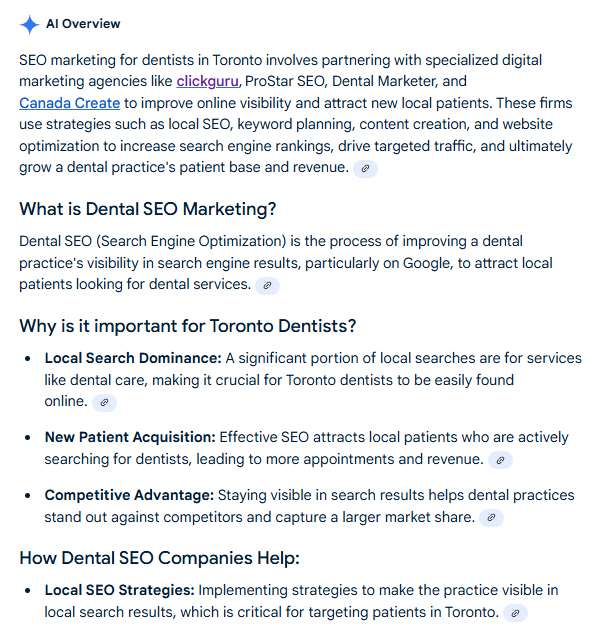
AI Overviews are short, machine-generated summaries that Google shows at the top of some results. They answer a question in plain language and list a few source links where people can learn more. Picture a quick briefing pulled from trusted pages. If a user types “Is fluoride safe for kids,” an Overview might say fluoride is considered safe at recommended levels and then cite several reputable sources. For a Toronto practice, that means a parent could get a quick answer on the results page and then choose which site to visit for details such as appointment booking or cost.
This guide explains when AI Overviews appear, how Google seems to pick sources, and how a Toronto dental clinic can increase the odds of being cited while protecting click-throughs on high-value queries.
When AI Overviews appear in Toronto searches
Google shows Overviews when its systems decide that generative AI would be helpful. In practice this happens most often on broad informational questions. Think of searches like:
-
“How long does teeth whitening last”
-
“Root canal vs extraction”
-
“What causes sensitive teeth”
-
“Is Invisalign faster than braces”
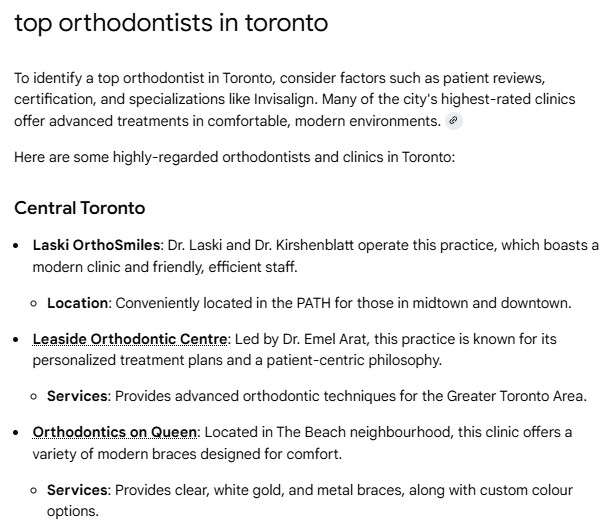
Overviews are less common on local intent queries such as “dentist near me” or “emergency dentist Toronto,” where map packs and ads already answer the need to contact someone now. That split matters for your strategy. Use informational pages to earn citations and credibility. Use local and transactional pages to drive calls and bookings.
How Google seems to choose sources
Google has not shared a full recipe, but several ingredients are clear from documentation and observed behavior.
-
Core ranking systems still matter. If your page already competes for page-one positions on “Invisalign Toronto” or “Toronto dental implants cost,” it has a real chance to be cited. Signals like authority, reviews, and helpful content still apply.
-
AI models do the writing, not the judging. The text is generated by large models, but those models lean on the same pool of pages Google already trusts.
-
Knowledge bases add facts. The Knowledge Graph can influence entity names, clinic details, and definitions in the summary.
-
Sensitive topics raise the bar. Oral health is a YMYL topic. Experience, expertise, authority, and trust carry more weight for clinical content than for a coffee roast comparison.
-
Media and structure help. Clear headings, FAQ sections, images or short videos, and valid schema markup make your page easier to parse and quote.
Short version. If your content already looks like a top result for Toronto dental queries, you can be part of the sources that feed an Overview.
How to check whether your Toronto practice appears
You will not find a dedicated Overview report in Search Console yet, so use practical checks.
-
Search in a private window. Try terms such as “Do veneers stain Toronto,” “Aftercare for dental implants Toronto,” or “How to stop tooth pain at night.” If an Overview appears, scan the citations to see if your brand is listed.
-
Watch your impressions vs clicks. In Google Search Console, group informational queries. If impressions remain steady but clicks fall, an Overview may be satisfying the question on the results page.
-
Track featured snippets and People Also Ask. If you already win these for “How long does a crown take” or “Is Invisalign painful,” you are near the quality bar for Overview citations.
-
Use third-party tools as a guide. Some platforms flag queries that frequently show Overviews. Use those lists to prioritize content refreshes.
clickguru can run a quick audit to identify Toronto queries where Overviews are common and show how your pages compare to current winners.
How to earn citations and protect traffic in Toronto
The steps below raise your chances to be cited while keeping conversions healthy if some clicks fall on informational terms.
1) Align each page with one dominant intent
Pick one core question per page or per major section and answer it fast. For example, on a page titled “Root Canal vs Extraction in Toronto,” include a two to three sentence comparison in the first 100 to 150 words. Then expand into risks, benefits, recovery, and cost for the rest of the page. Do not bury the direct answer under a long preface.
Toronto example: A North York practice publishes “Emergency Root Canal vs Extraction for Severe Toothache.” The first paragraph compares pain relief speed, long-term tooth preservation, and cost ranges in Toronto dollars. Below that, a booking button offers same day appointments.
2) Write concise, quotable blocks
Overviews tend to lift a sentence or a short paragraph. Add compact answer boxes for common questions and keep them between 40 and 60 words.
Toronto example snippets to add:
-
“How long does teeth whitening last”
“Professional whitening results often last six to twelve months in Toronto, depending on coffee, tea, and red wine intake. Touch-ups and good home care help maintain shade between visits.” -
“Is Invisalign faster than braces”
“Mild to moderate alignment cases can finish faster with Invisalign, often in 6 to 12 months, while complex movements may still take longer than a year. A consultation confirms your timeline.”
Place these answers near the top, then elaborate below.
3) Strengthen E E A T for oral health topics
List author credentials, add a clinician review note, and display the last medical review date. Use clinic photos and procedure imagery shot in your own operatory.
Toronto example: A page on “Dental Implants Cost in Toronto” includes a byline for Dr. Jane Kim, DDS, with RCDSO licence number, five-year experience in implantology, and a note reading “Clinically reviewed March 2025.” The page cites current fee guide ranges and explains factors that move cost up or down in the GTA.
4) Use structured data and clean HTML
Mark up FAQs, LocalBusiness, and medical procedures with schema where appropriate. Use descriptive H2 and H3 headings such as “Toronto Invisalign Timeline” or “Emergency Tooth Extraction in Midtown.” Keep scripts lean to improve render time.
Toronto example: A Midtown clinic adds FAQ schema to questions like “Do you accept the Canadian Dental Care Plan” and “Do you offer direct billing,” and uses LocalBusiness schema to reinforce name, address, phone, and hours that match the Google Business Profile.
5) Add media that supports the answer
Short explainer videos and simple diagrams increase understanding and time on page. A 60 second clip explaining “What to do in the first hour of a dental emergency in Toronto” can keep visitors engaged and signals usefulness to Google.
Toronto example: An office in Etobicoke embeds a 45 second video on “What to do if a tooth is knocked out,” filmed in the clinic with a dentist demonstrating safe handling and transport in milk. The transcript sits below the video for accessibility.
6) Build interactive assets the SERP cannot copy
If an Overview answers the basics, you still need a reason for a user to visit your site. Tools and templates give that reason.
Toronto examples:
-
A whitening shade simulator where patients match current shade and see expected outcomes and maintenance tips
-
A chair time estimator for “Invisalign Toronto” based on case complexity that outputs an estimated aligner count
-
A CDCP eligibility and co pay calculator for Toronto residents that uses household size and income brackets
These keep users on your domain since the interactivity cannot be replicated inside the Overview.
7) Target questions where Overviews struggle
Some topics require nuance or local specifics that do not fit a single sentence. Own those questions.
Toronto examples:
-
“Best mouthguard for Toronto hockey leagues” with fit types, costs, and local pickup options
-
“Parking and TTC access for our Yonge and Eglinton dental clinic” with a map and step by step directions
-
“Aftercare for winter sensitivity in Toronto” that explains cold air triggers and treatment options
Pages like these are both helpful to patients and hard for Overviews to replace.
Measuring impact with Toronto context
Expect some CTR changes on informational queries while transactional queries remain stable. Track success with a local lens.
-
Group keywords by intent and geography. Separate “what is” and “how to” from “dentist near me” and “Invisalign Toronto.” Watch each group over time.
-
Watch assisted conversions. A parent who reads an Overview for “fluoride safety” may return later with a branded search such as “Dr. Kim Davisville.” Track multi touch paths and branded growth in the GTA.
-
Monitor on page engagement. If fewer people click but those who do are more qualified, your time on page and conversion rate may rise. Keep an eye on calls, forms, and online booking completions.
-
Refresh on a set schedule. Update fees, policies, and clinical notes each quarter. Add new FAQs that match the questions you see in Search Console, such as “Does your clinic accept CDCP in Toronto.”
Pitfalls to avoid
-
Thin rewrites of common answers. If your whitening article matches wording found on several other Toronto sites, it will likely be ignored. Add your photos, your post care tips, and your pricing context.
-
Walls of text. Without headings, lists, and answer boxes, your page is hard to quote.
-
Optimizing only for the snippet. Keep the full page useful and conversion ready. Clear CTAs, phone numbers, and booking widgets matter.
-
Ignoring the money pages. While you improve informational content, keep building and refining service pages for “emergency dentist Toronto,” “Invisalign Toronto,” and neighborhood terms such as “dentist North York” and “dentist Leslieville.”
What this means for your Toronto practice
AI Overviews are another layer on the results page that rewards clarity, authority, and a good user experience. If you align each page with a clear intent, present crisp answers, strengthen clinical credibility, and add interactive tools that Overviews cannot replace, you can earn citations and keep a steady flow of qualified visitors.
Want a blueprint tailored to your neighborhood and services? clickguru can audit your content, surface Toronto queries that trigger Overviews, and build a plan that ties citations and clicks to booked appointments. Tell us your top three services and the parts of the GTA you serve, and we will show you where to win next.